Your AI can't read PDFs. We fix that.

BlazeDocs is the PDF-first document ingestion layer for AI workflows — turning messy PDFs into clean, agent-ready Markdown for OpenClaw, Hermes, RAG pipelines, Obsidian, Notion, and API-driven systems.

For developers & agents

$ npm i -g blazedocs
$ pnpm add -g blazedocs
$ yarn global add blazedocs
$ bun add -g blazedocs
$ npx skills add https://github.com/kyle93afc/blazedocs-cli --skill blazedocs
$ curl -X POST https://blazedocs.io/api/v1/convert \
  -H "Authorization: Bearer $BLAZEDOCS_API_KEY" \
  -F "file=@./paper.pdf"

Install once. Then blazedocs convert <file> from any terminal.

Or just drop a PDF

No credit card required
Tables & formulas preserved
Agents, RAG, knowledge workflows
Supported today
PDF ingestion

Text PDFs, scanned PDFs, forms, tables, research papers, and reports.

Best for
Agent-ready output

Preserve hierarchy, tables, formulas, and reading order before chunking or prompting.

Roadmap
Images next

Direct image support is next up. DOCX, PPTX, and XLSX are planned — not live yet.

See It In Action

Real documents. Real results. No cherry-picking.

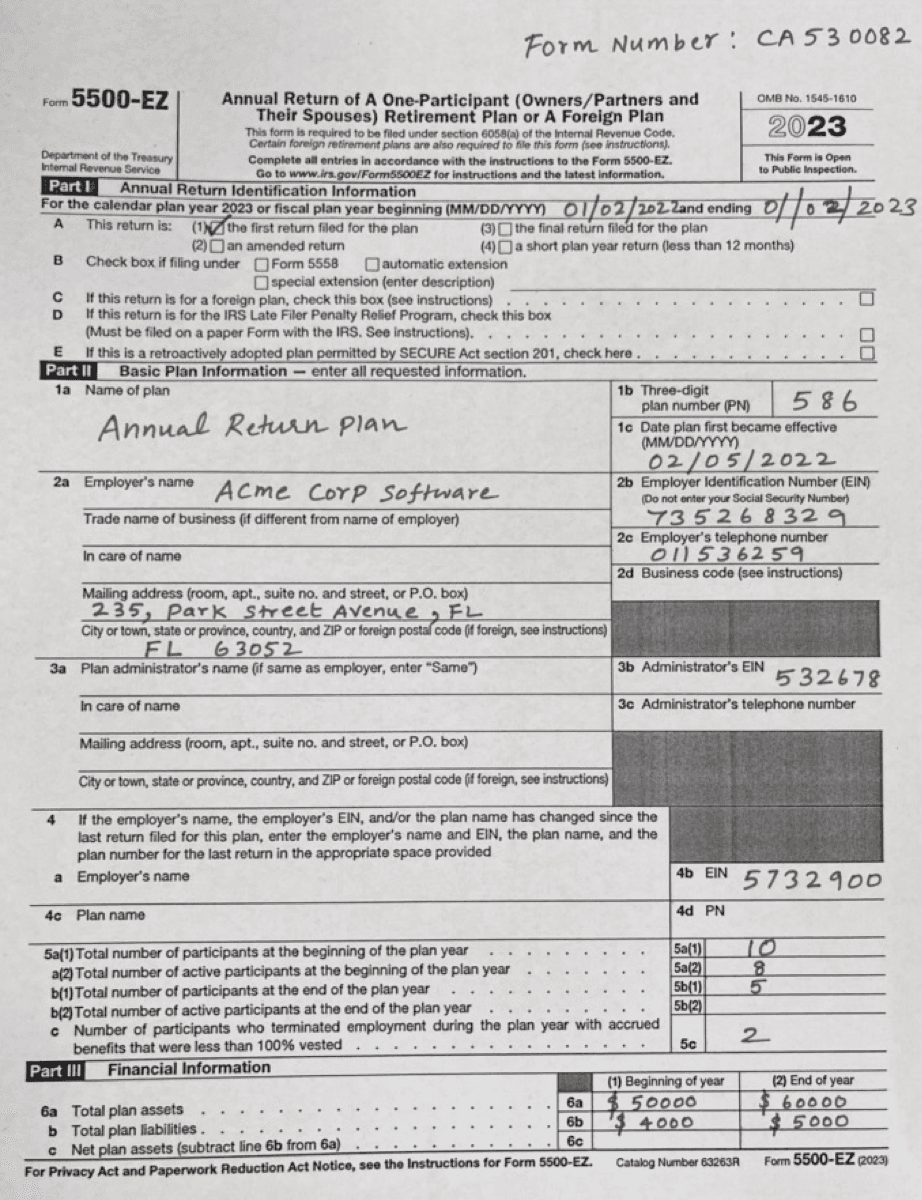
Reads handwritten text within printed forms

3,857 characters extracted

Original Document
Filled IRS Form 5500-EZ with handwritten entries — plan names, employer details, and financial figures perfectly extracted.
Hover to magnify
Rendered Output

Form Number: CA530082

Form 5500-EZ Annual Return of A One-Participant (Owners/Partners and Their Spouses) Retirement Plan or A Foreign PlanOMB No. 1545-1610 2023
This Form is Open to Public Inspection.

Part I Annual Return Identification Information

For the calendar plan year 2023 or fiscal plan year beginning 01/02/2022 and ending 01/02/2023

A This return is: (1) the first return filed for the plan (3) the final return filed for the plan

(2) an amended return (4) a short plan year return (less than 12 months)

B Check box if filing under Form 5558 automatic extension

special extension (enter description)

C If this return is for a foreign plan, check this box (see instructions)

D If this return is for the IRS Late Filer Penalty Relief Program, check this box

E If this is a retroactively adopted plan permitted by SECURE Act section 201, check here

Part II Basic Plan Information — enter all requested information.

1a Name of plan *Annual Return Plan*1b Three-digit plan number (PN)586
1c Date plan first became effective **02/05/2022**
2a Employer's name *Acme Corp Software*2b EIN **735268329**
2c Employer's telephone number **011536259**
Mailing address **235, Park Street Avenue, FL**
City **FL 63052**
5a(1) Total number of participants at the beginning of the plan year5a(1)10
5a(2)8
5b(1)5
5c2

Part III Financial Information

(1) Beginning of year(2) End of year
6a Total plan assets6a $ 50000$ 60000
b Total plan liabilities6b $ 4000$ 5000

Filled IRS Form 5500-EZ with handwritten entries — plan names, employer details, and financial figures perfectly extracted.

Powered by the BlazeDocs AI Engine — 99.9% accuracy across 50+ languages

Watch BlazeDocs handle messy PDFs

Prefer a walkthrough before uploading your own file? This short product demo shows how the OCR pipeline preserves structure, tables, and formulas.

New Feature

Chat with Your Converted Documents

Transform your PDFs into an intelligent knowledge base. Convert, organize, tag, and chat with your documents using AI to unlock their full potential.

Why convert first? LLMs struggle with raw PDF formats—tables break, formatting gets lost, and context is misunderstood. Convert to markdown first so AI can properly understand your data structure and deliver accurate answers.

What are the key findings in this research paper?

Based on the document, the key findings include:

  • Improved accuracy rates of 95%+
  • Reduced processing time by 60%
  • Enhanced scalability for large datasets
Ask another question...
Document loaded
AI-powered responses

Why Convert Before Chatting?

PDFs are terrible for LLMs. Uploading a raw PDF to ChatGPT or Claude results in broken tables, lost formatting, and confused AI responses. The AI simply can't understand the structure properly.

Markdown makes AI smart. Convert to clean markdown first, and suddenly your AI understands table relationships, document hierarchy, and data context—delivering accurate, reliable answers every time.

Instant Answers

Stop searching through documents manually. Ask questions and get instant, contextual answers from your PDF content.

Better AI Understanding

Raw PDFs confuse LLMs—formatting breaks, tables corrupt, and context is lost. Convert to markdown first so AI can properly parse your data structure, understand tables, and deliver accurate responses. Essential for RAG pipelines.

Save Time

Quickly extract insights, summaries, and key information without reading entire documents. Boost your productivity.

❌ Uploading Raw PDFs to LLMs

What happens when you upload PDFs directly to ChatGPT, Claude, or your RAG system:

  • Tables break and data becomes unreadable
  • Formatting and document structure is lost
  • AI misunderstands context and relationships
  • Formulas and special characters get corrupted
  • Inaccurate, unreliable AI responses

✅ Convert to Markdown First

What happens when you convert PDFs with BlazeDocs before using AI:

  • Perfect table structure preserved for AI parsing
  • Clean formatting AI can understand
  • AI grasps full context and relationships
  • Formulas converted to proper LaTeX notation
  • Accurate, reliable AI responses every time

Example Questions You Can Ask

Research Papers

What methodology was used in this study?

Legal Documents

What are the key terms and deadlines?

Technical Docs

How do I use the API authentication endpoint?

Reports

What are the main findings and recommendations?

Stop Fighting With Broken PDFs in Your LLM

Uploading PDFs directly to ChatGPT, Claude, or your RAG system leads to corrupted tables, lost formatting, and inaccurate AI responses. BlazeDocs converts your PDFs to pristine markdown first—so your AI actually understands your data and delivers reliable answers.

Automatic categorization
Smart tagging
AI-powered chat
Document intelligence
CLI quickstart

Install once, convert PDFs from any shell.

The BlazeDocs CLI is built for local scripts, CI jobs, and agent workflows. Runblazedocsto launch guided setup and store your API key.

Requires Node.js 18 or later before install.
Plain blazedocs starts the API key prompt when no key is stored.
Prefer no global install? Use npx blazedocs convert report.pdf --output report.md.
Open CLI docs
Package manager
Requires Node.js 18+
$ node --versionv18 or newer
$ npm install -g blazedocs
$ blazedocsguided setup
$ blazedocs convert report.pdf --output report.md

Verify

blazedocs --versionblazedocs versionblazedocs --helpblazedocs help

AI-Powered Document Intelligence

Experience the future of document processing. Our advanced AI doesn't just extract text—it understands structure, preserves formatting, and delivers production-ready Markdown every time.

Why this matters for AI: Raw PDFs break LLMs—tables corrupt, formatting fails, and context is lost. Our markdown conversion makes your documents AI-readable, so ChatGPT, Claude, and RAG systems can properly understand and work with your data.

Example
Recent Conversions

A preview of your BlazeDocs dashboard. Your actual conversion history appears here once you sign up.

#DateStatusFilePagesSize
103/28/2026Completed
📄
research-paper.pdf
15612.3 MB
203/27/2026Processing
📘
technical-manual.pdf
898.7 MB
303/26/2026Completed
📊
financial-report.pdf
423.2 MB
403/25/2026Failed
🔍
scanned-document.pdf
1245.6 MB

High OCR Accuracy

Advanced AI processes even complex PDFs with tables, mathematical formulas, and multi-column layouts perfectly. Handles scanned documents, handwriting, and technical diagrams.

📄PDF🤖AI📝MDOCR • Tables • Formulas • Images • StructurePowered by Mistral AI

Format-Perfect Output

Get clean, structured Markdown that works everywhere—Obsidian with WikiLinks and tags, Notion with proper blocks, GitHub with perfect formatting. No manual cleanup required.

Example activity
PDF Converted·Just now

research-paper.pdf → markdown

Lightning Fast

Process your PDF documents quickly and efficiently with our optimized conversion engine.

Enterprise Security

Your documents are processed securely and never stored. SOC2 compliant with end-to-end encryption.

Smart Processing

AI automatically detects document structure, extracts metadata, and optimizes formatting for your workflow.

AI Chat with Documents

PDFs uploaded directly to LLMs result in broken responses. Convert to markdown first, then chat with your documents to get accurate, context-aware answers. Transform your PDFs into an intelligent knowledge base that AI can actually understand.

Automatic Tagging & Categorization

Smart AI automatically categorizes and tags your documents for better organization. Build a centralized documentation hub where all your files are intelligently organized and easy to find.

How It Works

Transform your PDFs into clean, structured Markdown and chat with them using AI. Our AI-powered engine handles the complexity so you don't have to.

1

Upload Your PDF

Drag and drop your PDF file or click to browse. We support text-based PDFs, scanned documents, research papers, contracts, and technical documentation up to 50MB.

2

AI Processing

Our Mistral AI-powered OCR analyzes your document structure, extracts text with 99.9% accuracy, preserves tables and formulas, and converts everything to clean Markdown format.

3

Download & Use

Get your perfectly formatted Markdown file instantly. Copy to clipboard, download as .md, or import directly into Obsidian, Notion, or your RAG pipeline. Ready to use, no cleanup needed.

4

Chat & Organize

Ask questions about your converted documents and get instant AI-powered answers. Documents are automatically categorized and tagged for easy organization in your documentation hub.

What Makes Our Conversion Different?

Structure Preservation

Unlike basic converters, we maintain document hierarchy with proper heading levels (H1-H6), nested lists, and semantic structure optimized for LLM consumption.

Table Accuracy

Complex tables with merged cells, multi-line content, and numeric data are converted to clean Markdown table syntax with perfect alignment.

Formula Conversion

Mathematical formulas are automatically converted to LaTeX notation, preserving equations, symbols, and mathematical expressions for technical documentation.

RAG-Optimized Output

Output is structured for Retrieval-Augmented Generation pipelines with clean paragraph breaks, proper metadata, and semantic chunking boundaries.

Perfect for Every Workflow

From academic research to enterprise documentation, BlazeDocs transforms how professionals work with documents across industries.

Documentation Management Hub

Centralize all your documentation in one intelligent platform. Convert PDFs to markdown, automatically tag and categorize, and chat with your documents using AI for instant answers.

Common Documents:

  • Centralized document storage
  • Automatic categorization and tagging
  • AI-powered document chat
  • Document intelligence platform

Perfect for:

teams, knowledge workers, organizations

Academic Research

Convert research papers, journals, and academic documents into searchable Markdown for your reference management system.

Common Documents:

  • Research papers with complex formulas
  • Academic journals with tables
  • Conference proceedings
  • Thesis documents

Perfect for:

researchers, students, academics

Technical Documentation

Transform API docs, manuals, and technical specs into clean Markdown for your documentation workflow.

Common Documents:

  • API documentation
  • Software manuals
  • Technical specifications
  • Code documentation

Perfect for:

developers, technical writers, DevOps teams

Content Creation

Convert reports, whitepapers, and presentations into editable Markdown for your content marketing and blog posts.

Common Documents:

  • Marketing whitepapers
  • Industry reports
  • Case studies
  • Presentation slides

Perfect for:

content marketers, copywriters, bloggers

Legal & Compliance

Convert contracts, legal documents, and compliance materials into structured format for easier review and collaboration.

Common Documents:

  • Legal contracts
  • Compliance documents
  • Policy manuals
  • Regulatory filings

Perfect for:

legal teams, compliance officers, paralegals

Knowledge Management

Digitize handwritten notes, scanned documents, and legacy PDFs into your personal knowledge base or team wiki.

Common Documents:

  • Meeting notes and minutes
  • Scanned handwritten notes
  • Legacy documents
  • Team knowledge bases

Perfect for:

knowledge workers, consultants, teams

Educational Content

Convert textbooks, course materials, and educational resources into interactive Markdown for e-learning platforms.

Common Documents:

  • Course textbooks
  • Training materials
  • Educational worksheets
  • Study guides

Perfect for:

educators, instructional designers, students

Ready to Transform Your Document Workflow?

Join thousands of professionals who've revolutionized their document processing with AI-powered PDF to Markdown conversion.

Trusted by Researchers, Developers & Teams

See why professionals choose BlazeDocs for their PDF to Markdown workflows.

I convert research papers into my Obsidian vault daily. BlazeDocs handles tables and citations better than anything else I've tried.

Sarah M.

PhD Researcher

We process hundreds of legal briefs monthly. The accuracy on scanned documents is impressive — saves our team hours of manual cleanup.

James K.

Legal Consultant

Finally a PDF converter that outputs clean Markdown for my RAG pipeline. No more wrestling with broken table formatting.

Alex T.

Software Engineer

Switched from Adobe Acrobat for Markdown conversions. Faster, cheaper, and the output actually preserves document structure.

Maria L.

Content Manager

Simple, Transparent Pricing

Professional PDF-first document ingestion for AI workflows. Choose your plan based on pages processed per month. No hidden fees, guaranteed quality.

Free

Get started at no cost

$0/ month
Get Started Free
  • 3 free PDF uploads per month
  • Each upload converts the first 5 pages of one PDF
  • Files up to 10MB
  • Standard processing speed
  • Markdown download

Or just install the CLI

$ npm i -g blazedocs

Experience Perfect PDF Conversion

Stop wasting time with manual formatting. Convert your PDFs to beautiful Markdown in seconds. Choose your plan and start converting today.

Frequently Asked Questions

Everything you need to know about converting PDFs to Markdown with AI-powered accuracy.

Why can't ChatGPT read PDFs properly?

PDFs are rendering instructions, not structured data. They tell a printer where to place pixels, not what the content means. When ChatGPT or other LLMs ingest a PDF directly, they lose:

  • Table relationships and column alignment
  • Reading order in multi-column layouts
  • Heading hierarchy and document structure
  • List formatting and nested content

Converting to Markdown first gives the LLM clean, semantic text — improving answer accuracy by 25–40%.

What is the best document format for AI?

Markdown is the best format for AI and LLM consumption. It preserves document structure (headings, lists, tables, code blocks) in a lightweight text format that fits naturally into context windows. Unlike PDF which requires parsing rendering instructions, or DOCX which embeds content in XML, Markdown is directly readable by any language model with zero preprocessing.

This is why RAG pipelines, AI agents, and knowledge bases overwhelmingly use Markdown.

What is PDF to Markdown conversion?

PDF to Markdown conversion transforms documents from a fixed visual format into structured, editable text. The process extracts content while preserving headings, tables, lists, and code blocks — outputting clean Markdown for use in:

  • Knowledge bases and documentation (Obsidian, Notion)
  • AI/LLM pipelines and RAG systems
  • Version-controlled repositories

How do I prepare PDFs for RAG pipelines?

Convert PDFs to Markdown first to preserve heading hierarchy, table structure, and reading order. Then chunk by semantic sections (using Markdown headings as natural boundaries) rather than fixed token counts.

This improves retrieval precision by 25–40% compared to feeding raw PDF text into your vector store. BlazeDocs automates the conversion step, producing clean Markdown optimised for chunking and embedding.

Does BlazeDocs work with AI agents like OpenClaw or Hermes?

Yes. BlazeDocs outputs clean Markdown that works well with AI agents, OpenClaw workspaces, Hermes knowledge workflows, and API-driven RAG pipelines.

The API returns structured JSON and Markdown output that agents can search, quote, chunk, and reason over more reliably than raw PDFs.

See our dedicated guide for AI workflows on PDF to Markdown for AI agents.

How accurate is BlazeDocs OCR?

Mistral AI-powered OCR achieves 99.9% character accuracy on most documents. Text-based PDFs convert with near-perfect accuracy. Even challenging scanned documents with handwriting or poor image quality maintain 95%+ accuracy.

Every conversion includes confidence scores so you know exactly what to expect.

What types of PDFs can BlazeDocs convert?

Virtually any PDF format:

  • Text-based PDFs with perfect accuracy
  • Scanned documents using AI-powered OCR
  • Complex layouts with tables and multi-columns
  • Mathematical formulas and equations
  • Technical documents with code blocks
  • Multi-language documents in 50+ languages

Is my data secure?

Yes. Documents are processed with end-to-end encryption, never permanently stored, and automatically deleted after processing. SOC2 compliant — suitable for sensitive legal, medical, and confidential business documents.

How does pricing work?

Simple subscription plans:

  • Free: $0/mo — 3 PDF uploads/month, each upload converts the first 5 pages of one PDF
  • Starter: $7.99/mo — 500 pages, 20MB file limit
  • Pro: $14.99/mo — 2,500 pages, document AI chat, 50MB file limit
  • Enterprise: $49.99/mo — 10,000 pages, priority support, 50MB file limit

All plans include the same AI processing quality. 14-day money-back guarantee on all paid plans.